What this project does
A thermistor changes resistance as its temperature changes. In this project, a 3.3 V microcontroller reads that change through an analog input and turns on an LED when the thermistor becomes warmer than a threshold you choose. It is a temperature indicator, not a calibrated thermometer: its purpose is to show a change relative to the conditions where you set it up.
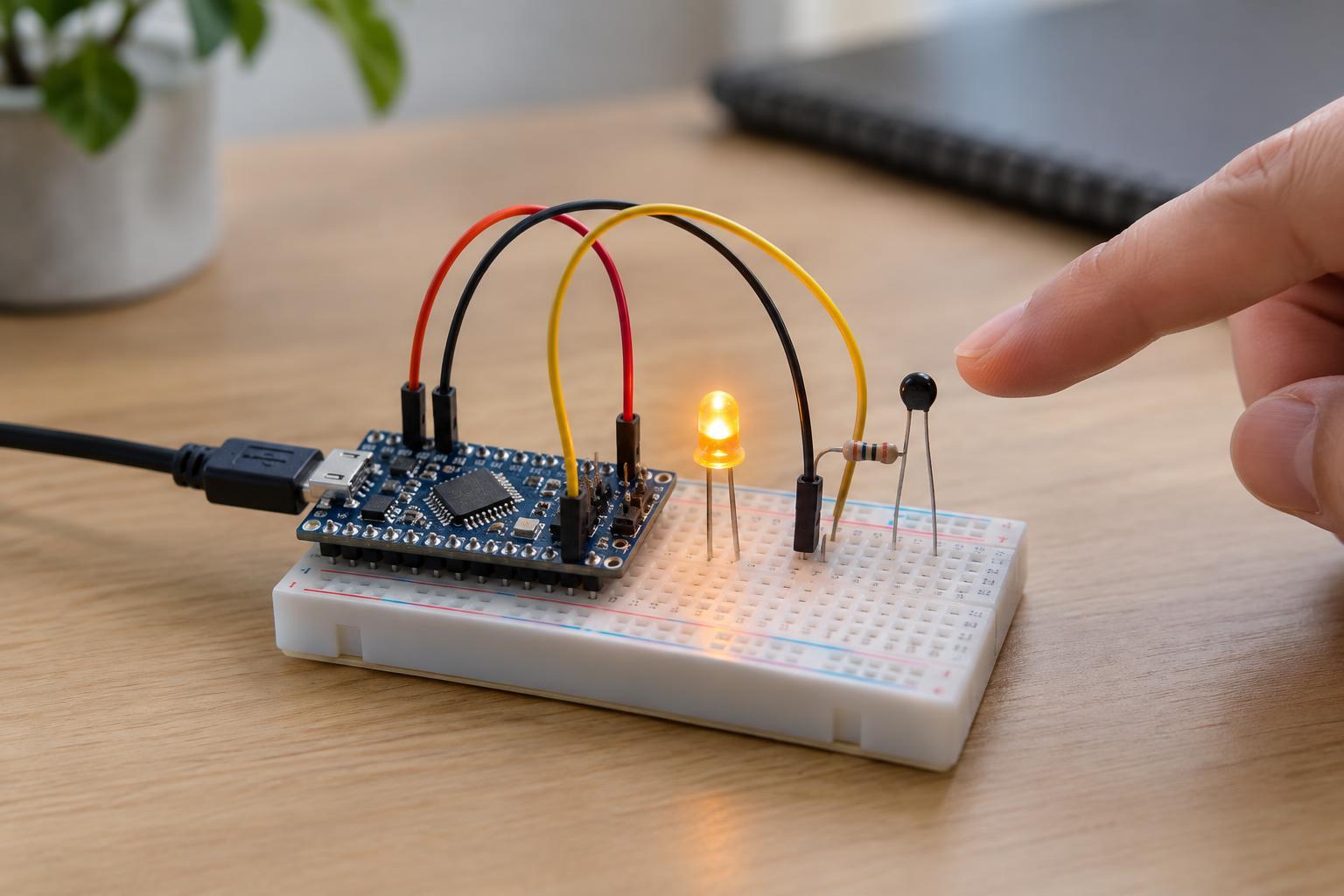
Use a 10 kΩ NTC thermistor, a 10 kΩ fixed resistor, a low-power LED, a 1 kΩ LED resistor, a breadboard and jumper wires. “NTC” means the thermistor’s resistance decreases as it warms. Use a microcontroller board with a 3.3 V supply output, an analog input suitable for the voltage it will receive, and a digital output suitable for driving the chosen LED at low current. Check the board’s pin documentation before connecting anything; pin labels and electrical limits vary.
Build the sensing and LED circuits
With the board unpowered, connect the 10 kΩ fixed resistor from 3.3 V to an empty breadboard row. Connect one thermistor lead to that same row and its other lead to ground. Finally, connect the shared row to an analog input. The two resistors form a voltage divider: the analog input reads the voltage at their junction. Because the thermistor is on the ground side, warming it makes the junction voltage fall. A 10 kΩ thermistor is nominally 10 kΩ at its specified reference temperature, often 25 °C; when both parts are near 10 kΩ, the junction voltage is about half the 3.3 V supply.
For the indicator, connect a digital output to the 1 kΩ resistor, the resistor to the LED’s positive lead, and the LED’s negative lead to ground. The longer LED lead is often positive, but verify its orientation from the part’s markings or documentation. In this arrangement, setting the output high turns the LED on. The resistor limits LED current; do not connect an LED directly to an output pin. Keep all connections on the board’s low-voltage side.
Choose a threshold from readings
In your board’s programming environment, read the analog input repeatedly and display the readings through a serial monitor or another available debug view. Take a few readings while the thermistor rests at room conditions. Then hold the thermistor gently between your fingers, avoiding its metal leads, and watch for a lower reading. The response may take several seconds. Let it return toward its starting reading before choosing a threshold between the two observed ranges.
Program the LED to switch on when the reading drops below that threshold. To prevent flickering near the boundary, use two thresholds: switch on below a lower value and switch off only after the reading rises above a higher value. For example, if room readings cluster near 500 and warmed readings near 450, you might try switching on below 465 and off above 485. Those numbers are illustrations, not values to copy: analog reading scales differ between boards, and your actual readings should determine the settings. Between the two thresholds, leave the LED in its previous state.
A short pause between readings can make the output easier to observe. If the readings jump around, averaging a few consecutive samples may help, but first check for loose wires. This approach does not require converting the readings into degrees. For a meaningful temperature measurement, you would need the thermistor’s specifications and a calibration appropriate to the accuracy you need.
Test and troubleshoot safely
Power the board only through a suitable, intact low-voltage supply, such as its normal USB connection. Do not connect this breadboard circuit to household wiring, heaters, appliance internals or unknown power sources. Keep liquids away, and unplug power before moving wires. Warm the thermistor with your hand rather than exposing it to a flame or other hot object.
If the reading barely changes, confirm that the analog wire goes to the junction between the two resistors, not directly to 3.3 V or ground. If warming makes the reading rise instead of fall, the fixed resistor and thermistor may have swapped positions; either restore the described wiring or reverse the comparison in your program. If the LED stays dark, check its orientation, its series resistor and the output pin selected in the program. An LED that remains on may simply need a better threshold.
Finally, verify that the analog pin never receives more voltage than its documented limit. Some boards use 3.3 V logic but have analog-input limits or pin arrangements that differ from this example. Once the indicator responds reliably, try moving the thermistor to a shaded location and observe how its reading changes over time. Avoid placing it against electronics that could become hot: this small project is for learning about sensing, not for protecting equipment from overheating.