Start with the safest cleaning option
A button may feel sticky because a drink, food residue, or ordinary grime has collected around its edges. That does not necessarily mean the circuit board needs cleaning. Begin with the remote switched off, if it has a power switch, and remove its batteries. Keep loose batteries away from children and pets, especially small button cells. If a battery is swollen, leaking, or unusually hot, stop handling the remote and follow local guidance for safe battery disposal rather than continuing the cleaning job.
For an assembled remote, wipe the case with a soft cloth lightly dampened with water and a little mild dish soap. The cloth should feel damp, not wet enough to drip. Work around the buttons with a barely damp cotton swab, then lift loosened grime with a dry swab or cloth. Do not spray cleaner onto the remote or let liquid run into button gaps. Give the exterior time to dry before testing it with batteries.
Decide whether to open the case
If the buttons still stick, cleaning beneath the keypad may help. First check whether the case has visible screws, including inside the battery compartment. Some remotes also use snap clips that can break when forced. If the case resists gentle opening, or the remote is sealed or difficult to replace, stop rather than prying harder. Exterior cleaning is a reasonable endpoint.
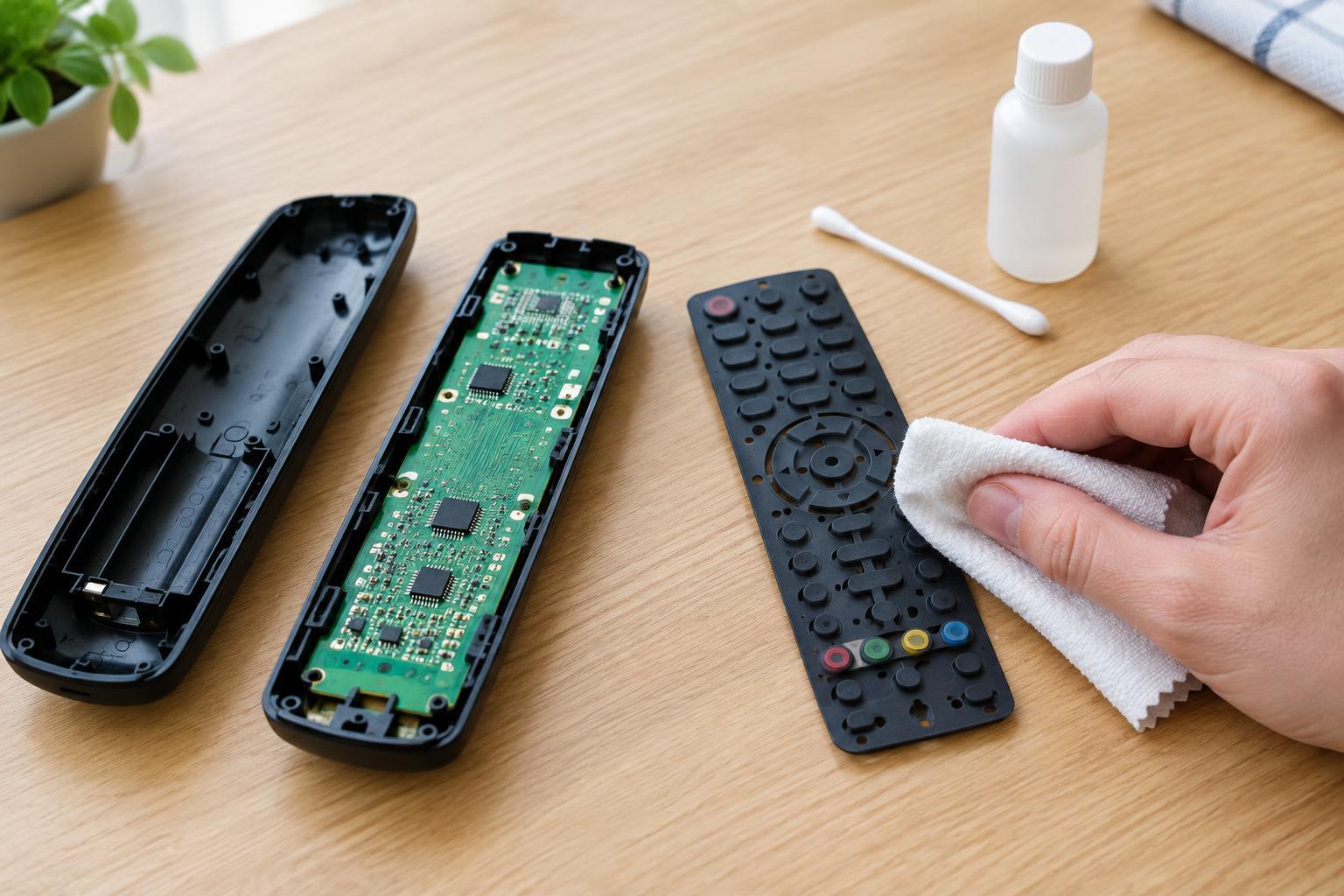
If you can open it, work on a clean, dry surface with good light. Take a photo before lifting parts so you can see where the button pad, board, and any small pieces belong. Use an appropriate screwdriver for screws and a plastic opening tool for clips. Keep track of the screws, and avoid pulling on wires or bending the board. This task is limited to a battery-powered remote: do not use these steps to open equipment connected to a wall outlet.
Wash the removable button pad, not the board
Many remotes have a single flexible silicone pad beneath the plastic case. If that pad lifts out freely, you can usually clean it separately with lukewarm water and a small amount of mild dish soap. Gently rub away residue with your fingers or a soft cloth, paying attention to the edges of buttons and the openings in the case. Avoid abrasive pads, strong solvents, and hard scrubbing, which can damage the pad or the dark contact areas on its underside.
Rinse the pad with a small amount of clean water so soap does not leave a slippery film. Set it on a clean towel and let it dry completely, including its recesses and edges. Clean the empty plastic case with a lightly damp cloth, keeping liquid away from any parts you could not remove. The circuit board should stay out of the sink: immersing it or washing it under a tap can leave moisture trapped under components.
Handle the circuit board sparingly
Often the board needs no cleaning at all. If you can see residue on its button-contact areas, remove loose debris with a clean, dry, soft brush. For a small stubborn spot, you may use a swab barely moistened with electronics-grade isopropyl alcohol, provided the remote’s materials and instructions permit it. Touch only the affected area; do not pour alcohol onto the board or scrub hard. A swab that leaves a wet trail contains too much liquid.
The contact pattern, protective coatings, and nearby components can be delicate. Do not scrape the contacts with a metal tool or try to make them shiny by sanding them. If there is widespread residue, visible corrosion, or damage from a leaking battery, cleaning may not restore reliable operation. Keep damaged batteries out of the device and consider whether repair or responsible electronics recycling makes more sense than further work.
Dry, reassemble, and test
Before reassembly, check that the pad, case, and any cleaned board area are fully dry. If you are unsure whether moisture remains in a button recess or under an edge, wait longer; avoid a hair dryer, oven, or other heat source. Fit the pad back into its original position, align the case halves, and close clips gently before replacing screws. The buttons should move freely and return to their normal height.
Install batteries of the type specified for the remote, observing the polarity marks, and test several buttons. If one remains sticky, remove the batteries and check whether the pad or case is misaligned. If a button moves normally but still fails to operate, the cause may be a worn contact or another fault rather than leftover grime. Avoid repeated wet cleaning in that situation; a replacement remote or a suitable repair may be the more practical choice.