What the buzzer needs
A passive piezo buzzer does not produce a steady beep just because voltage is applied. Its piezoelectric element flexes when the voltage across it changes. Repeating that change makes the element vibrate and produces sound. This makes it useful for a small project that plays confirmation beeps, alerts or a short sequence of notes without an audio amplifier.
Check the part before wiring it. A passive piezo buzzer or piezo element is intended to be driven by an alternating signal. An active buzzer contains circuitry that generates its own tone when powered, so it is not the right choice for experimenting with pitch in the same way. Product labels can be inconsistent; if you have a module rather than a bare two-lead part, check its pin labels and instructions before connecting it. A module may contain additional components and may expect a different drive arrangement.
Connect it within the GPIO limits
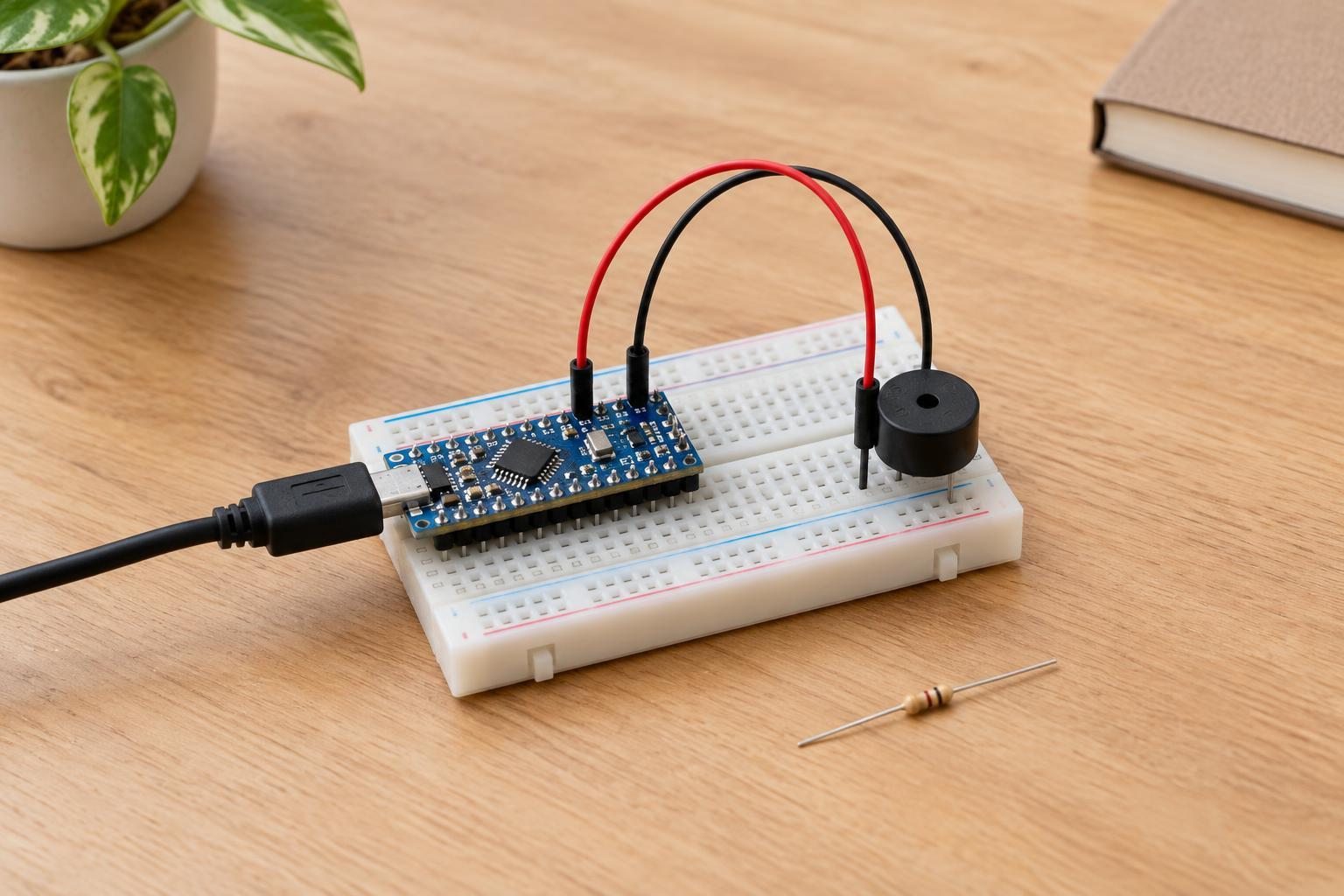
For a basic build, use a 3.3 V microcontroller board, a passive piezo buzzer, a breadboard and jumper wires. With the board unpowered, connect one buzzer lead to a GPIO output through a series resistor, and the other lead to the board’s ground. A resistor around 100–330 ohms is a reasonable starting point for a small passive piezo element, though it may reduce the volume. If the buzzer marks one lead as positive, use that lead on the GPIO side.
Confirm that the part is suitable for the board’s output voltage and that its electrical load is within the GPIO pin’s specifications. Piezo elements behave partly like capacitors, so switching them can briefly demand more current than their quiet sound suggests. Use a driver circuit if the part’s requirements exceed what the pin can provide. Do not connect a conventional low-impedance speaker directly to a GPIO pin as a substitute, and do not use mains power or an unknown external supply for this project.
Turn timed pulses into a note
A tone comes from switching the GPIO output high and low repeatedly. The frequency—the number of complete high-low cycles per second—sets the perceived pitch. For a 440 Hz tone, one cycle takes about 2.27 milliseconds. With the output high for half of each cycle and low for the other half, the pin changes state about every 1.14 milliseconds. That produces a square-wave signal; it will sound more buzzy than a pure sine wave.
Many microcontroller platforms provide a tone function or a PWM peripheral that can generate this repeated signal. Configure the selected pin as an output, set the frequency, and let the signal run for the desired note length. To make a melody, play one frequency for a set duration, stop the signal for a brief gap, then start the next frequency. If your platform has no suitable tone function, a timed loop can toggle the pin, but other work in that loop may disturb the timing. Hardware-generated PWM is often easier when the project also needs to read buttons or sensors.
Start with a single comfortable beep at a moderate pitch. Once it works, try two distinct frequencies followed by a short silence. Notes need not be exact to make a useful status indicator: a rising pair can mean one event and a falling pair another. Leave enough silence between patterns that they remain easy to distinguish.
Troubleshoot and extend the project
If there is no sound, first check that the GPIO number in the program matches the physical connection and that the buzzer’s other lead reaches ground. Verify that the output actually switches rather than staying high. Then check whether the part is passive: an active buzzer may respond to steady power but not reproduce the changing pitches you expect. On a module, confirm what its signal pin is designed to accept before changing the wiring.
If the tone is faint, try a different frequency; piezo sound levels can vary noticeably with frequency and mounting. Also check the resistor value and the part’s voltage rating. Do not increase the drive voltage or bypass the GPIO limits simply to make it louder. If a louder alert is necessary, choose a suitable driver and sounder rather than asking the pin to supply more than it can safely deliver.
Once the basic circuit is reliable, a button can select between two tone patterns, or a low-voltage sensor can trigger a brief alert. Keep the buzzer off between events, make the patterns short enough to be useful, and test the sound at a considerate volume. The same small circuit is a practical way to learn how timed digital outputs become a physical signal.