What this small circuit teaches
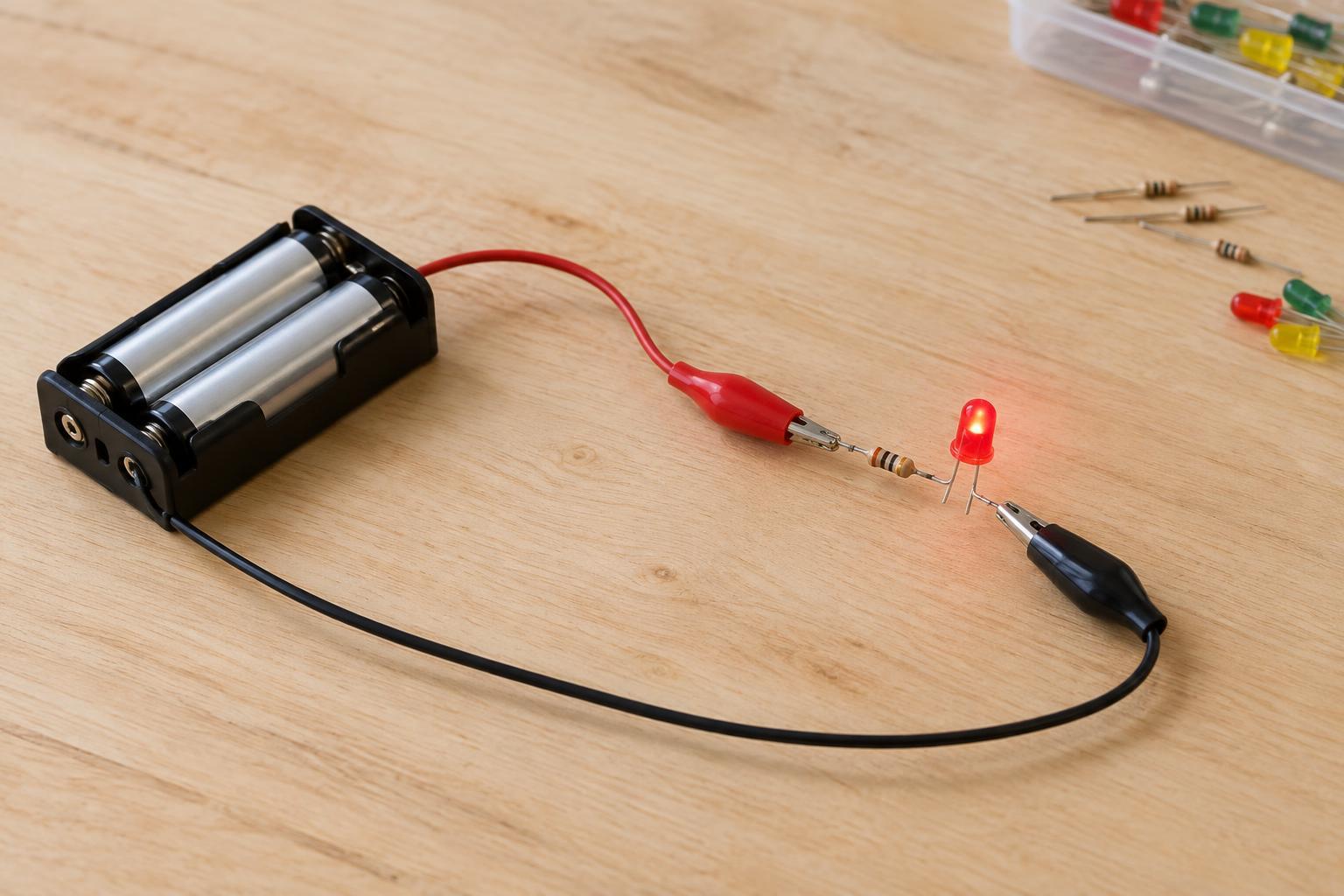
An LED indicator is a useful first low-voltage project because its behavior is easy to see: complete the circuit and the light turns on; break the circuit and it turns off. This version uses two AA cells in a battery holder, one red LED, and one resistor. It is a battery-only project. Do not connect it to a wall outlet, a mains-powered device, or an unfamiliar power supply.
The cells provide roughly 3 volts together, depending on their type and condition. An LED conducts mainly in one direction and needs its current limited. The resistor performs that job by reducing the current flowing through the LED. Without it, the LED could be damaged even though the battery voltage seems low.
Gather the parts and identify the connections
You will need a two-AA battery holder with leads, two matching AA cells, a standard red LED, a 220-ohm resistor rated at 1/4 watt or higher, and a small breadboard or suitable insulated connectors. Short jumper wires may help with a breadboard. The resistor may be placed on either side of the LED as long as the resistor and LED are connected in series, with only one path for current.
An LED has an anode and a cathode. On a new through-hole LED, the longer leg is usually the anode, marked for the positive side of this circuit. The shorter leg is the cathode; a flat edge on the LED body often marks that side too. If the legs have been trimmed, check for a reliable marking rather than guessing. A resistor has no required orientation.
Use a red LED for this first build. Blue and white LEDs often need more voltage and may glow weakly or not at all from two AA cells. Choose cells of the same type and similar age, and follow the holder’s polarity markings when inserting them.
Connect the LED, resistor, and battery holder
Leave the cells out of the holder while you assemble the circuit. Connect the holder’s positive lead to one end of the 220-ohm resistor. Connect the resistor’s other end to the LED’s anode. Connect the LED’s cathode to the holder’s negative lead. In plain text, the path is: battery positive → resistor → LED anode → LED cathode → battery negative. On a breadboard, check that each intended connection shares an electrically connected row; nearby holes are not always joined.
Inspect the wiring before adding the cells. Bare metal from the positive lead must not touch the negative lead directly. Insert the AA cells in the directions shown on the holder. The LED should light. The resistor limits current to a modest level in this setup, though the exact brightness will vary with the LED and cells. A 220-ohm resistor is a practical starting value, not a promise of identical brightness with every part.
To turn the indicator off, remove a cell or disconnect one lead. Do not leave loose wires where they might touch and short the holder. If a cell, wire, or resistor becomes noticeably hot, disconnect the circuit promptly and check for an unintended short.
If it does not light
First, remove a cell before moving wires. Check the cell orientation, then trace the entire path from the positive lead through the resistor and LED back to the negative lead. Make sure the LED’s anode faces the resistor and positive side. Reversing an LED in this low-voltage circuit usually prevents it from lighting; correcting its direction is a good first test.
If you used a breadboard, check its row connections and make sure the LED legs are not plugged into the same connected row. Confirm that the resistor is marked 220 ohms and that its leads make firm contact. Weak or depleted cells can also produce a dim result. Change only one thing at a time so you can tell which adjustment fixed the problem.
Once it works, try lifting one connection and replacing it to see how opening and closing the circuit controls the indicator. Keep the resistor in place during every test. When finished, remove the cells for storage, especially if the project uses temporary connections that could shift.